
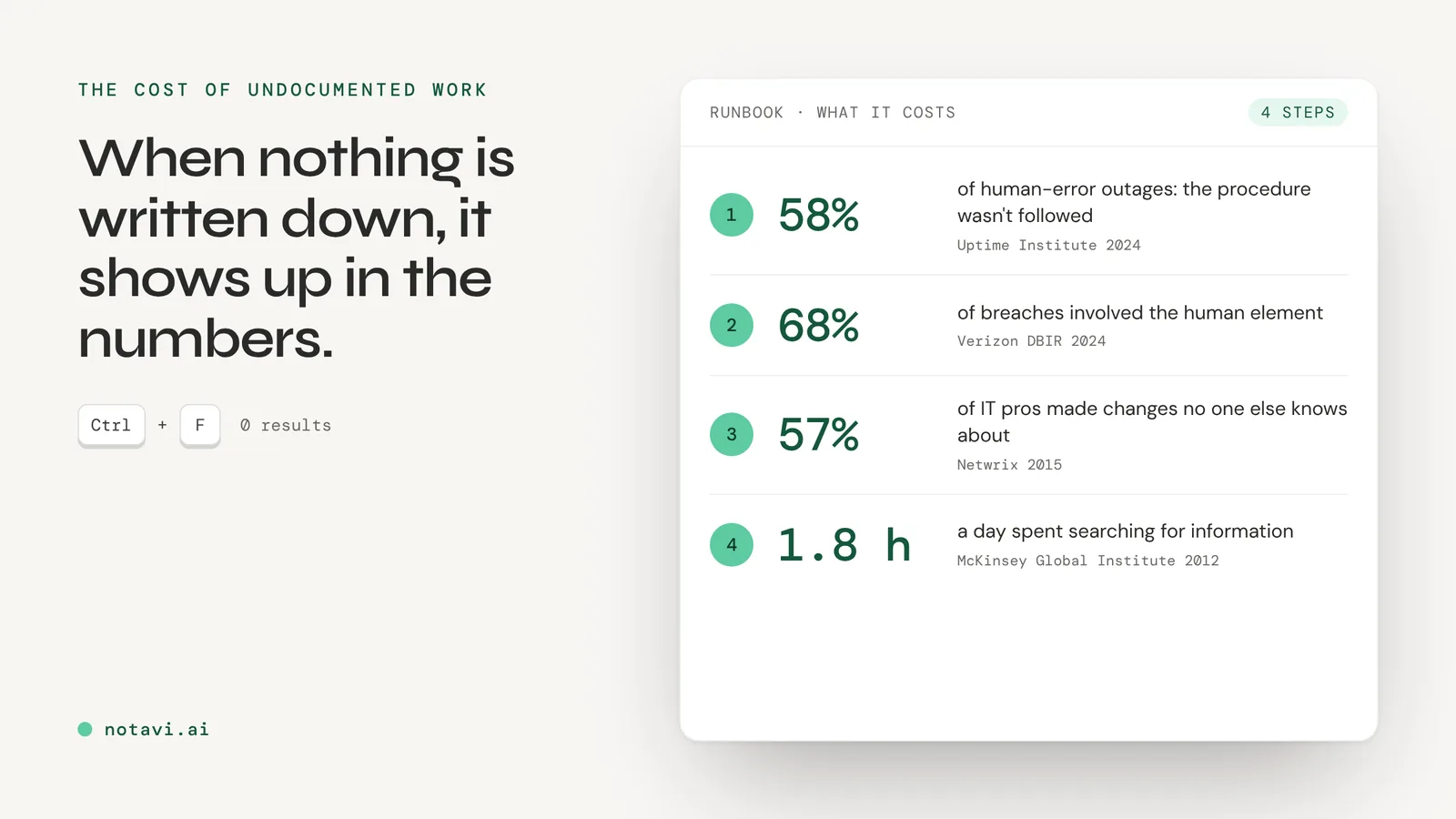
You just inherited the environment. No diagrams, no procedures, no handover notes. The person who built it has left, or is leaving, and the real documentation is in their head, in a few old tickets, and in the muscle memory of whoever is still around. There is the server nobody wants to reboot, the renewal nobody remembers owning, and the fix for the thing that breaks every third Tuesday that lives in exactly one person’s memory.
So where do you start?
Start by giving up on the idea of documenting everything. You will not, and you should not try. A runbook that tries to cover the whole estate never gets finished and never gets read. The goal is narrower and more useful: turn the handful of procedures that would hurt the most, if they were done wrong or forgotten, into pages anyone on the team can follow.
Why this is worth your time before the next fire
When a serious incident happens, the cause is usually not the hardware. It is a step someone skipped, or a step nobody ever wrote down.
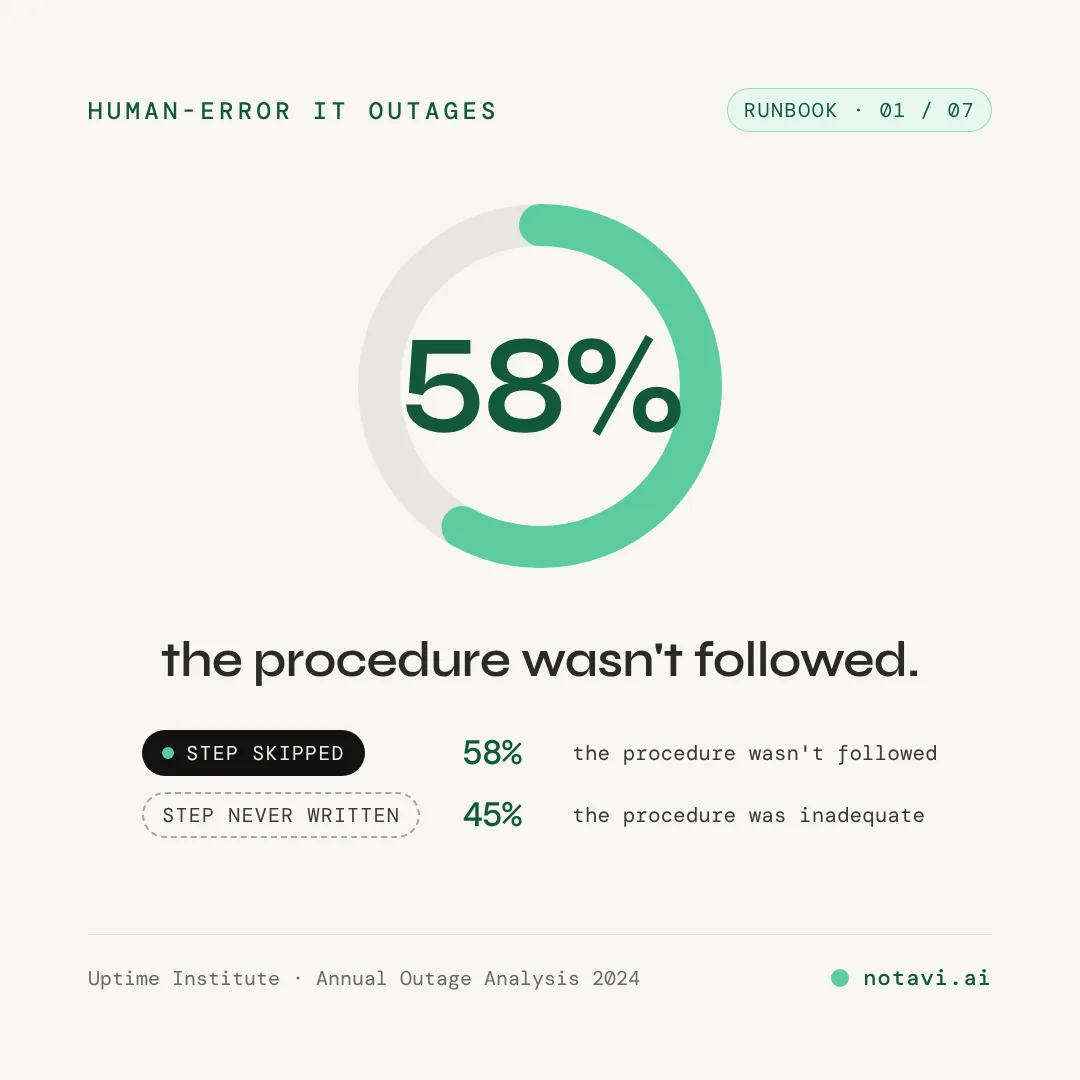
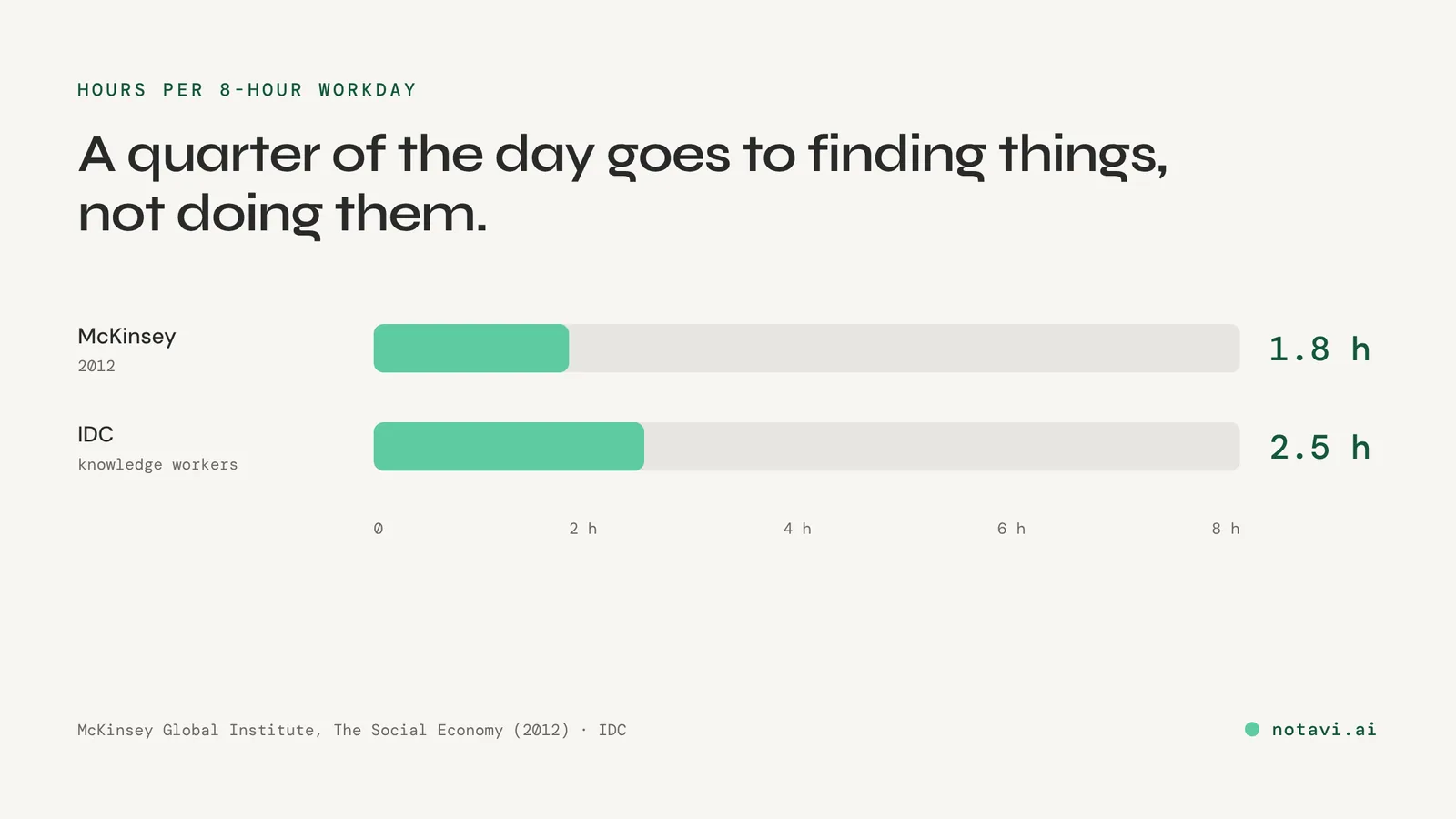
That is the whole case for a runbook in one chart. The failures that take you down are process failures, and process is the one thing you can fix on a quiet afternoon instead of at 2 a.m. And the quiet cost runs the whole time underneath: the hours that disappear into working out what someone already knew.
The framework: what to document first
Score every candidate procedure on two things, and let the scores pick the order for you.
Blast radius. If this goes wrong, or if the one person who knows it is unavailable, how bad is it? A failed domain controller restore is a bad day for everyone. A mislabeled network port is not.
Bus factor. How many people can actually do this today? If the answer is one, the knowledge is one resignation, one sick day, or one vacation away from gone.
Those two axes give you four groups, and a clear order:
- High blast radius, low bus factor. Document now. Big consequences, and only one person knows how. This is the group that turns into a crisis. Reset the admin credentials, restore from backup, fail over the VPN, rebuild the domain controller. If one person holds any of these, that is your first page.
- High frequency, low risk. Document soon. Onboarding, access requests, mapping a drive, the password reset you explain every week. Low drama, but documenting it buys back the most time, because you stop re-explaining it.
- High blast radius, well known. Keep it fresh. Several people can do it, so you are not exposed today, but write it down before that stops being true.
- Low blast radius, low frequency. Leave it. You will never finish if you chase these. Let them stay in people’s heads.
Work the list top down. You are not building a library. You are removing single points of failure, starting with the one that would hurt most.
How to actually capture it, without a documentation project
The reason the runbook never gets written is the blank page. Nobody has a free afternoon to reconstruct a procedure from memory, in order, with screenshots, for a task they could just do.
So do not reconstruct it. Capture it the next time you do it for real.
The next time the high-priority task comes up, document it in the flow of doing it: note each step as you take it, grab the screen at the moment that matters, and write the one line you would say to a colleague looking over your shoulder. One real task becomes one finished procedure, and you were going to do the task anyway.
This is exactly what we built Notavi for: you press a shortcut as you work and Notavi captures the step, screenshot and all, so the finished guide is a byproduct of doing the job once. But the tool matters less than the habit. Document in the moment, one procedure per real task, and the runbook comes together easily, out of work you were already doing.
What a good runbook entry looks like
Keep the shape the same every time, so the fifth entry reads like the first and anyone can follow it cold. A worked example:
Restore a single file from the nightly backup
When to use: A user has lost or corrupted a file that was present as of last night. Who can run it: Any helpdesk tech with backup-console read access. Before you start: The file’s original full path, and the user’s confirmation of roughly when it was last good.
- Open the backup console and sign in.
- Search the protected set for the file by name or path.
- Select the most recent version from before it was lost. Confirm the date.
- Restore to a staging folder, not over the live file, so you can verify first.
- Open the restored copy and confirm it is the right version with the user.
- Move it into place, and tell the user where it is.
Verify: The user opens the file and confirms the contents. If it goes wrong: If no clean version exists in the retention window, stop and escalate; do not overwrite the live file with a bad restore.
Six steps, a clear start, a verification, and a way out if it fails. That is a runbook entry. It is not a novel, and it does not need to be.
Start with one
You do not fix years of undocumented work in a week, and you do not need to. Pick the single procedure with the biggest blast radius that only one person knows. Document it the next time it comes up. You have just turned your worst single point of failure into a page anyone can follow.
Then do the next one. That is a runbook.